Design a Winning Chess Tournament Social Media Post
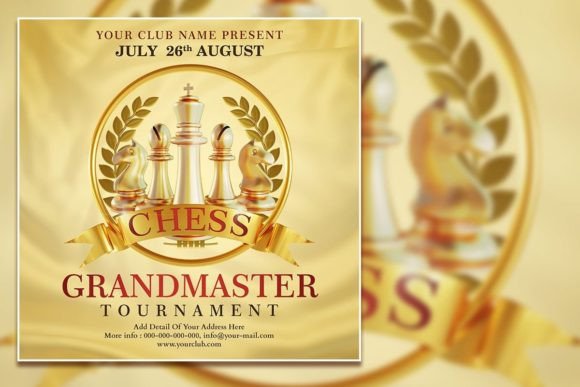
Picture this: you've organized a local chess tournament, booked the venue, and lined up the participants. Now you need to spread the word. A plain text announcement on social media won't cut it—you need something that captures the intellectual intensity and competitive spirit of the game. That's where a well-designed chess sport flyer template becomes your secret weapon for promotion.
Why Visual Design Matters for Chess Events
Chess carries a unique visual identity. The contrast of black and white pieces, the geometric precision of the board, and the quiet drama of two minds locked in strategic battle all translate beautifully into graphic design. When you're promoting a tournament, your visuals need to reflect that sophistication. A chess tournament social media post template built in PSD format gives you exactly that foundation—professional-grade design elements organized into editable layers so you can customize every detail without starting from scratch.
The template we're discussing measures 2000 x 2000 pixels at 300 dpi in RGB color mode. Those specifications matter more than they might seem at first glance. The square format works across Instagram, Facebook, and LinkedIn without awkward cropping. The resolution ensures your flyer looks crisp whether someone views it on a phone screen or you print it as a poster for the event venue. RGB color mode keeps your colors vibrant on digital displays, which is where most of your audience will encounter the design first.
Practical Applications Beyond Tournament Promotion
A chess sport social media post template serves far more purposes than announcing a single event. Consider the broader landscape of how chess imagery fits into modern branding and marketing:
- Chess clubs and academies can use the template as a starting point for recurring weekly posts, class announcements, and membership drives. Swap out the photo, update the text, and you have a consistent visual identity that your followers recognize instantly.
- Educational content creators who teach chess strategies on YouTube or TikTok can adapt the design for thumbnail graphics, lesson announcements, and course landing pages.
- Corporate event planners organizing team-building chess tournaments need polished invitations and internal communications that look professional without hiring a designer for every piece of collateral.
- Board game cafés and entertainment venues hosting casual chess nights benefit from eye-catching social media graphics that stand out in crowded feeds.
- Bloggers and editorial writers covering chess culture, tournament recaps, or player profiles can create branded header images that tie their content together visually.
The versatility extends to merchandise as well. Chess-themed apparel, mugs, and accessories sold through print-on-demand platforms need clean, scalable designs. A well-organized PSD template with separated layers makes it straightforward to extract elements and adapt them for different product formats.
Working With an Editable PSD Template
Adobe Photoshop remains the industry standard for detailed design work, and there's good reason this chess sport tournament editable PSD template uses that format. Organized layers mean you're not digging through a jumbled mess trying to figure out which element sits where. Each text block, graphic element, and background component lives on its own layer, clearly labeled for easy navigation.
Here's a practical workflow for customizing your template:
- Open the PSD file in Adobe Photoshop. Take a moment to explore the layer structure before making changes. Understanding how elements are grouped saves time later.
- Replace the placeholder text using the text tool. Simply click on any text layer, select the content, and type your tournament details—date, time, location, registration information, and contact details.
- Want a different typeface? Select the text and choose a font that matches your event's personality. A bold sans serif font communicates modern energy, while a classic serif font evokes tradition and prestige. Mixing a display font for the headline with a clean sans serif for body text creates visual hierarchy that guides the reader's eye.
- Swap the placeholder photo with your own image. A candid shot from a previous tournament, a dramatic close-up of chess pieces, or even a photo of the venue adds authenticity that stock images can't replicate.
- Adjust colors if needed to match your club's branding or the event's theme. The RGB color mode makes color adjustments straightforward without worrying about print conversion issues.
Typography Choices That Elevate Your Chess Brand
Font selection often makes or breaks a design. For chess-related graphics, you're walking a line between intellectual authority and approachable energy. Too formal, and you risk alienating casual players and newcomers. Too playful, and you undermine the competitive credibility that serious players expect.
A strong approach involves pairing two complementary typefaces. Use a bold display font or modern serif for the tournament name and headline information. This draws attention and establishes the event's character. For secondary details like rules, schedules, and contact information, a clean sans serif ensures readability at smaller sizes. This font pairing strategy creates a professional presentation that works across both digital and print applications.
Consider how your typography choices affect brand recognition over time. If you're running a chess club that hosts monthly tournaments, using consistent fonts across all your marketing assets—social media posts, printed flyers, email headers, and website banners—builds a visual identity that people associate with your organization. That consistency signals professionalism and helps your audience recognize your content immediately, even before they read a single word.
Maximizing Engagement Through Smart Design
A beautiful chess tournament social media post means nothing if nobody sees it. Design and marketing work hand in hand, and understanding how social platforms display your content helps you make smarter creative decisions.
That 2000 x 2000 pixel square format isn't arbitrary. Square posts receive more real estate on mobile feeds than landscape orientations. They also work reliably across platforms without platform-specific resizing. When your design fills the frame without empty margins or awkward letterboxing, it commands attention as users scroll through their feeds.
Readability deserves special attention in social media design. Text that looks perfect on your 27-inch monitor might be illegible on a phone screen. Test your design at actual viewing size before publishing. Key information—the event name, date, and a clear call to action—should be readable at a glance. If someone has to squint or zoom in, you've lost them.
The replaceable photo feature adds another dimension to audience engagement. Authentic images outperform generic stock photography consistently. A photo of real players at your venue, your chess club's logo, or even a custom illustration that reflects your community's personality creates an emotional connection that template graphics alone cannot achieve.
From Digital to Print Without Missing a Beat
One of the underrated advantages of a 300 dpi PSD template is its print readiness. Social media might be your primary promotion channel, but chess tournaments often benefit from physical marketing too. Community bulletin boards at libraries, schools, and coffee shops still attract attention. A printed poster at the tournament venue reinforces the event's legitimacy for walk-in spectators.
Because the template maintains high resolution in RGB, you have flexibility in how you output the final design. For digital use, export directly as PNG or JPG. For print, convert to CMYK in Photoshop and adjust any colors that shift during the conversion—bright blues and greens sometimes lose vibrancy in CMYK, so preview carefully before sending to a printer.
This dual-purpose capability makes the template a smart investment for anyone running recurring chess events. One design effort produces assets for Instagram stories, Facebook event covers, printed handouts, and email newsletters. That kind of efficiency matters when you're managing event logistics and don't have hours to spend creating separate designs for every channel.
Making the Template Your Own
The real value of an editable chess sport flyer template lies in its adaptability. The design provides structure and professional polish, but the final product should reflect your unique event and community. Experiment with different photo placements, try alternate color palettes that match your branding, and don't be afraid to rearrange elements within the organized layer structure.
Think about your audience when making creative decisions. A youth chess tournament might benefit from brighter colors and a more energetic typeface. A corporate chess championship calls for restrained elegance. An online blitz tournament could lean into digital aesthetics with bold gradients and modern typography. The template gives you a professional starting point—where you take it depends entirely on who you're trying to reach.
Every chess event deserves promotion that matches the thoughtfulness of the game itself. With the right design tools and a clear understanding of your audience, a single well-crafted template can become the foundation of a consistent, recognizable visual presence that draws players and spectators tournament after tournament.