Designing Your Next Event: The Sunday Electro Social Media Post Template
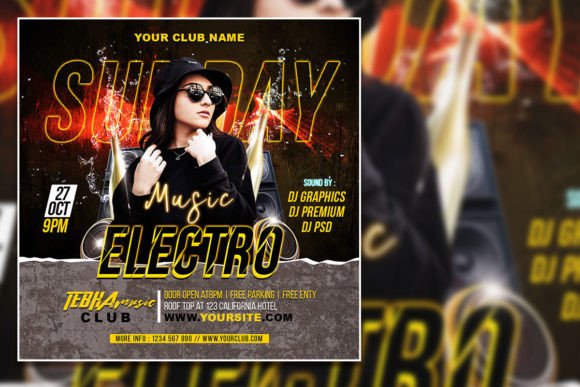
There’s a specific kind of energy that defines the best weekend events—a mix of anticipation, high-contrast visuals, and a promise of something memorable. For designers, event promoters, and business owners, capturing that energy in a single graphic is a constant challenge. You need something that feels both immediate and polished, something that stops a scrolling thumb and communicates an entire vibe in seconds. This is where a versatile, editable template becomes less of a shortcut and more of a strategic tool. The Sunday Electro Social Media Post and Editable Party Flyer Template is built for this exact purpose, offering a modern, high-impact canvas for promoting everything from a New Year’s bash to a product launch or a special community gathering.
Beyond the Party: Visual Identity for Any Occasion
While labeled as a party flyer, the true strength of this template lies in its adaptable visual language. The clean, modern layout and high-resolution (2000x2000 pixels at 300 dpi) foundation make it suitable for a wide range of professional applications. Imagine using it not just for a nightclub event, but for a boutique fitness studio promoting a new class series, a small business announcing a weekend sale, or a content creator teasing a live Q&A session. The organized layers in the PSD file mean you can deconstruct the design, keeping the compelling typography or the photo frame while completely reimagining the context. This flexibility is what separates a one-time-use graphic from a reusable design asset that supports consistent branding across multiple campaigns.
Practical Customization: Making It Uniquely Yours
The editability of this template is its core feature. All text is fully replaceable, allowing you to tailor the message precisely to your audience. But the customization goes deeper. You can swap the placeholder photo with your own high-quality image—perhaps a stunning product shot, a photo of your venue, or a compelling portrait that represents your brand. The color mode is set to RGB, perfect for digital use, but the 300 dpi resolution ensures that if you decide to create matching print materials like posters or invitations, the quality remains sharp. The key is to approach the template not as a finished piece, but as a professional starting point. Use the Adobe Photoshop file to adjust color schemes to match your brand palette, experiment with font pairings (the included fonts can be easily selected and changed with the text tool), and reposition elements to create a layout that feels entirely your own.
Strategic Typography and Layout for Maximum Impact
Effective event promotion graphics balance bold visual hooks with clear, readable information. This template’s design likely employs a strong display font for the main headline, which is ideal for grabbing attention. For supporting text—like dates, times, and details—you’ll want to ensure readability remains high, especially when viewed on small mobile screens. A good practice is to maintain a clear hierarchy: one dominant font for the event title, a complementary sans-serif or serif font for the details, and careful use of size and weight to guide the viewer’s eye. When you open the PSD file, take a moment to review how the original text is structured. This gives you a blueprint for how to present your own information logically, ensuring that the most critical details aren’t lost in the design.
Think about the practical output. Where will this graphic live? If it’s primarily for Instagram Stories or a Facebook event cover, you’ll design with vertical viewing in mind. If it’s for a website banner or a printed flyer, horizontal or square orientations might be more appropriate. The 1:1 aspect ratio of this template is a social media workhorse, perfect for feed posts across platforms. As you edit, keep your primary channel in mind. A design that looks perfect on a desktop screen might need slight adjustments to font size or element spacing to ensure it’s just as compelling on a smartphone.
From Digital to Print: Maintaining Professional Polish
One of the most valuable aspects of a high-resolution, layered template is its ability to bridge the digital and physical worlds. The same core design used for your social media announcement can be adapted for a printed invitation, a poster for your storefront, or even a simple handout. This creates a cohesive visual identity for your event or promotion, reinforcing brand recognition whether someone encounters you online or in person. When preparing for print, remember to convert the color mode from RGB to CMYK and consult with your printer for bleed specifications. The organized layers make these adjustments straightforward, allowing you to maintain a professional presentation across all materials without starting from scratch.
Ultimately, tools like the Sunday Electro template empower you to compete visually. They provide the structural foundation and aesthetic polish that might otherwise require significant time or budget. By investing a little time in thoughtful customization—aligning the graphics with your brand, ensuring your message is clear, and tailoring the output to your platform—you transform a generic template into a powerful piece of your marketing toolkit. It’s about working smarter, using proven design principles embedded in the template to create something that looks custom-made, captures the right energy, and effectively communicates your message to your audience.